Chateau Mobile Redesign!
The updated Chateau Mobile application is now available. The redesign features a modernized interface, improved performance, and simplified field inspection workflows.
Redesign Highlights
Key features of the redesign include:
-
Improved filtering tools for managing components within a tour.
-
A simplified, faster, and more intuitive Post-Inspection workflow.
-
Add via Photo: Technicians can now take a photo of multiple components and quickly create and tag new components directly from the image.
-
Faster device registration with QR code scanning.
-
Increased performance across all devices.
-
iOS Support: Chateau Mobile is now available for iOS devices. Please note that Bluetooth analyzer connections are not currently supported on iOS. Users must manually enter PPM values for M21 inspections on iOS.
Performance Improvements
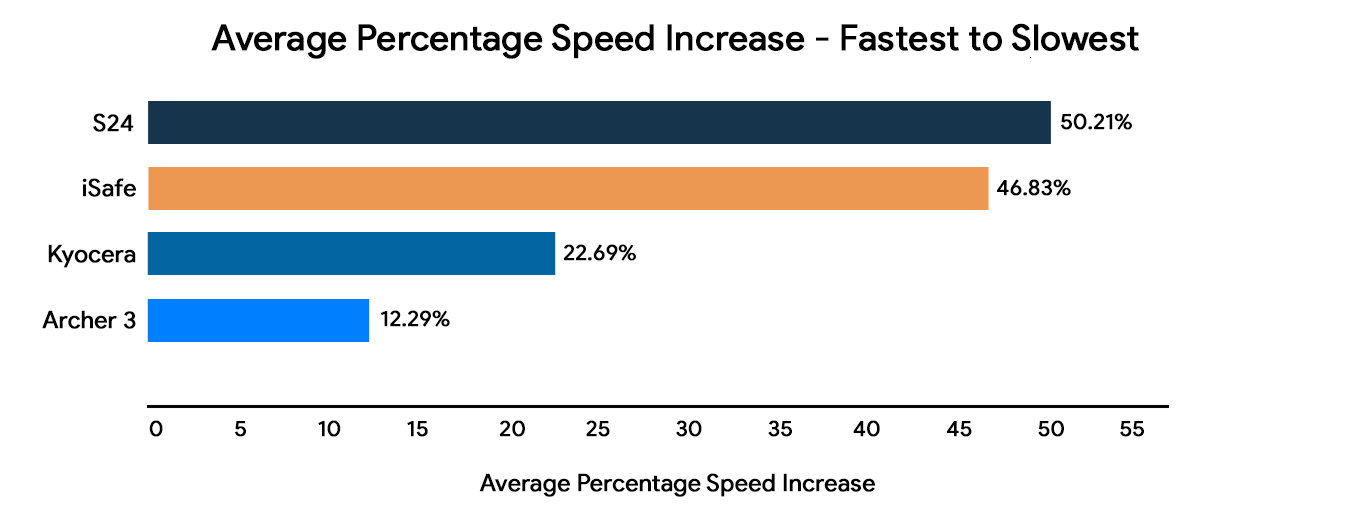
When compared to the previous version of Chateau Mobile, there are substantial speed improvements across the most frequently used handhelds:
New Training Material
Training resources for the new Chateau Mobile redesign are available. We recommend that you have your Technicians watch the applicable “What A Technician Needs to Know” tutorial video before installing the new App.
-
Chateau Mobile Tutorials
-
Additional tutorial videos are available here.
-
For an offline training tool, download the revised Chateau Mobile Training Manual.
Updating Chateau Mobile (Google Play)
Depending on your Google account, Chateau Mobile may not automatically update. Please follow the steps below to update your handheld so you can take advantage of this redesign. Please check in your data before updating Chateau Mobile.
- In the Google Play Store, click the circular profile button in the upper-right portion of the screen.
- Select Manage Apps & Device.
- Under the Manage tab, filter by “Installed” and “Updates Available.”
- Click Update.